Reduce noise and interference
Radio Bench provides separate tools for impulsive noise, steady carriers, and broad background noise. Apply one tool at a time when you evaluate it.
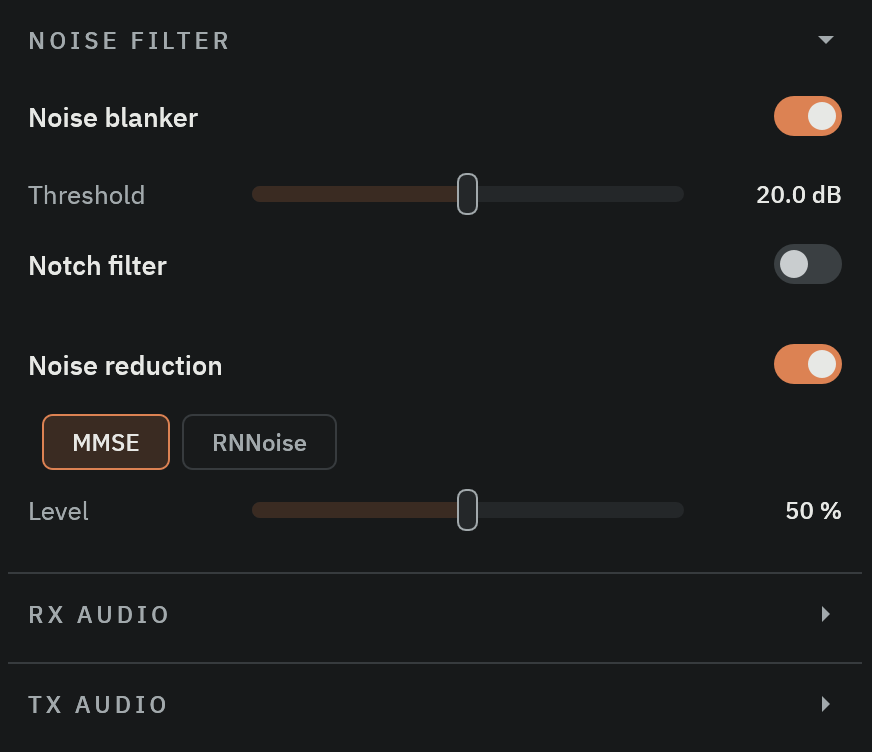
Noise blanker
Use the noise blanker for short impulse bursts. Turn on Noise blanker, then lower its Threshold until impulses reduce without damaging wanted audio. A lower threshold blanks more.
Open NOISE FILTER in the left control column to reach the blanker, notch, and noise-reduction controls.
A threshold that is too low can distort strong signals. Raise it when syllables or CW edges sound clipped.
Notch filters
Use an automatic or manual notch for a steady carrier inside the passband. A notch removes the carrier immediately from receiver audio.
Place a manual notch only on the interfering tone. A wide or misplaced notch can remove wanted audio.
Select a noise-reduction mode
Turn on the Noise reduction switch, then choose MMSE or RNNoise. They cannot run together. The switch restores the method you used last.
The NOISE FILTER section is not available while a digital mode is selected.
Those analog settings remain stored but are bypassed in digital modes. Returning to an analog mode restores their use.
For a comparison, stay on the same weak voice signal and listen with noise reduction off. Turn it on, select MMSE, then adjust Level. Compare RNNoise with the same signal. Keep the setting that improves intelligibility, rather than simply producing the least noise.
MMSE noise reduction
Select MMSE for broad, steady noise. Its Level control reads from 0 to 100 percent and sets how far the processor attenuates the noise floor.
MMSE learns the noise floor for about one second after selection or retuning. Some hiss remains to reduce watery processing artifacts.
A steady unmodulated carrier can fade after several seconds. Use a notch when you need immediate carrier removal.
RNNoise neural noise reduction
Select RNNoise to reduce background noise in received voice audio. This mode has no level control.
The transmit path has a separate Noise reduction control in the TX AUDIO section. Use that control to treat microphone audio before transmit.